
Bonjour for Mobile Web Server
There's one big gotcha with mobile web servers; they frequently move into new networks (WLAN hotspots), but even though you are using the very same network yourself, you might not know about the web server. This problem can be solved with service discovery protocols, such as Bonjour (DNS-SD, mDNS) or UPnP. These work by sending multicast UDP datagrams on the same subnet, so that service discovery aware clients can connect to services. Apple's Safari browser implements Bonjour based HTTP service discovery, and this is a demo how it works with MWS.
This is a simple demo application which demonstrates local service discovery for Mobile Web Server. It sends multicast dns-sd message to bonjour group address, containing entry similar to this:
peekpoke._http._tcp IN SRV 10 100 80 www.peekpoke.fi.
peekpoke._http._tcp IN TXT "path=/"
With some luck, this shows as a bonjour http service in safari, when the browser is running on the same subnet as server sending it (e.g. same WLAN router)
Originally, I had hoped to start service announce in apache boot, like this:
PythonImport bonjour_announce main_interpreter
But for some reason, I couldn't make it to work on MWS although it works on regular Apache.
So, this application works by asking browser to refresh itself and on each request it sends the mdns packet. After installing, to start service discovery, open your (mobile - or any other, but then you have to use the public address) browser to http://127.0.0.1/mdns/index.py, select wlan access point (on the phone - this is used for the multicast, not browser connection), leave mobile browser running in background and watch the safari on pc/mac to detect the server. You should automatically see MWS entry in the Bonjour bookmarks list:
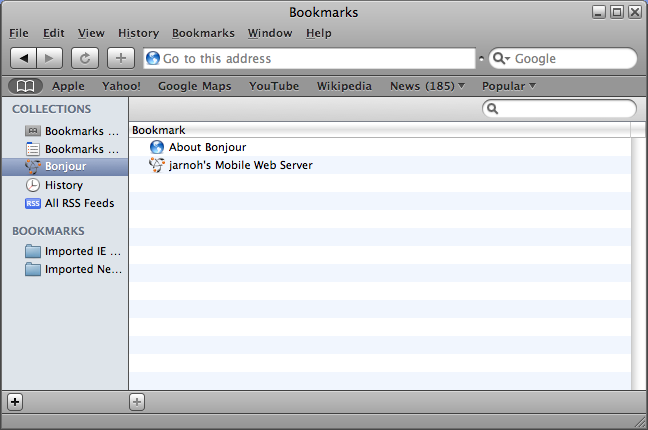
This entry points to your own hostname in .mymobilesite.net. It would be more efficient to use direct host IP, but unfortunately there is no simple way to retreive the local IP address of MWS (no local name, local address is 127.0.0.1 if request is coming from localhost etc)
Download
Application package Installs itself to htdocs/mdns directory. Install to same drive as MWS. Source code included.
Further information
More Multicast DNS, DNS Service Discovery and Bonjour related material can be found from Apple's Bonjour pages
Feedback
any comments to jarnoh@peekpoke.fi